

Most office layouts look right on move-in day. Then the team grows, or shrinks. Hybrid schedules shift your busiest days. I see it on almost every floor I plan: the rooms you built start to feel wrong.
Fixing that with drywall costs money and takes months. Modular office pods give you enclosed space without a full build-out. You can add, move, or swap them as needs change, so the layout grows with you.
In this guide, I’ll show you how to audit real demand, choose the right pod types, and plan a layout that can expand later.

Why Scalability Should Shape Your Pod Layout
Most teams plan for the office they have today. That’s the trap. Headcount, hybrid schedules, and budgets all shift. A layout locked to one moment can start costing you money within a year.
You can get it wrong in two directions. Both hurt, just in different places.
Build Too Much, and You Pay for Empty Rooms
I often walk floors where three or four small meeting rooms stay dark most of the week. One client built them for a team of 120. Two years later, about 60 people came in on a typical day.
Every unused enclosed room still eats rent. At $50 per square foot a year, an idle 120 ft² room costs you $6,000 annually. That money stays locked in walls you can’t move, sell, or shrink. Capital you spend early on space you may never need doesn’t come back.
Build Too Little, and Work Spills Into Hallways
The opposite problem shows up faster. Calls move to stairwells. People book a 10-seat room for a 15-minute chat. Managers field noise complaints every week.
Each gap pushes people toward a workaround. Every workaround spreads noise to someone else. Focus drops across the whole floor, not just for the person on the call.
Pods Let You Add Space in Small Steps
This is where pods change the planning math. You don’t have to guess your headcount three years out. You buy for the demand you can measure now, then add units as it grows.
A pod usually installs in a day or two. A built room needs permits, several trades, and often weeks of noise and dust. Pods go in without shutting down a zone, and you can move them when teams reshuffle.
Hybrid work makes this even more useful. Your Tuesday peak might double your Friday headcount. Pods let you size enclosed space to real peak demand, then adjust as patterns change.
So treat scalability as a planning rule from day one. Map where your first pods go, and mark where the next ones will go later.
What Modular Office Pods Actually Include
“Modular office pod” covers more products than most buyers expect. When a client asks me for “pods,” I start with one question: which conversations need a door?
Here’s what sits under that label, and how these units behave once they land on your floor.
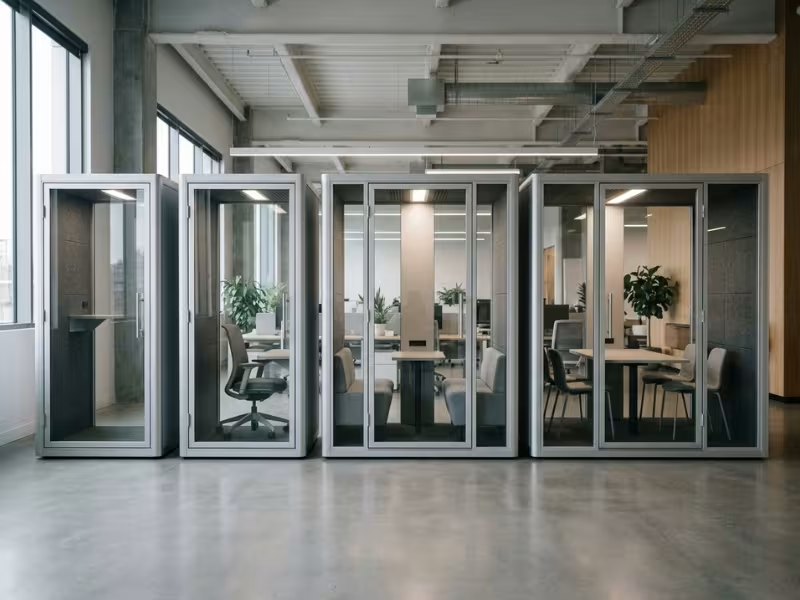
Four Pod Types Cover Most Needs
- Phone booths: Phone booths hold one person for calls and short focus sessions. Most take up about 1 m² (11 ft²), so they fit in corners, column bays, and corridor ends.
- Meeting pods: These seat two to six people at a real table. They handle one-on-ones, huddles, interviews, and hybrid calls without tying up a conference room.
- Focus pods: These give one person a full desk and enough room to settle in for an hour or more. Some offices also use them as wellness spaces for nursing, prayer, or a quiet break.
- Larger enclosed units: These work like small rooms. They host bigger team meetings or combine several spaces in one structure. Some cover 10 m² (108 ft²) or more.
How They Work Once They Arrive
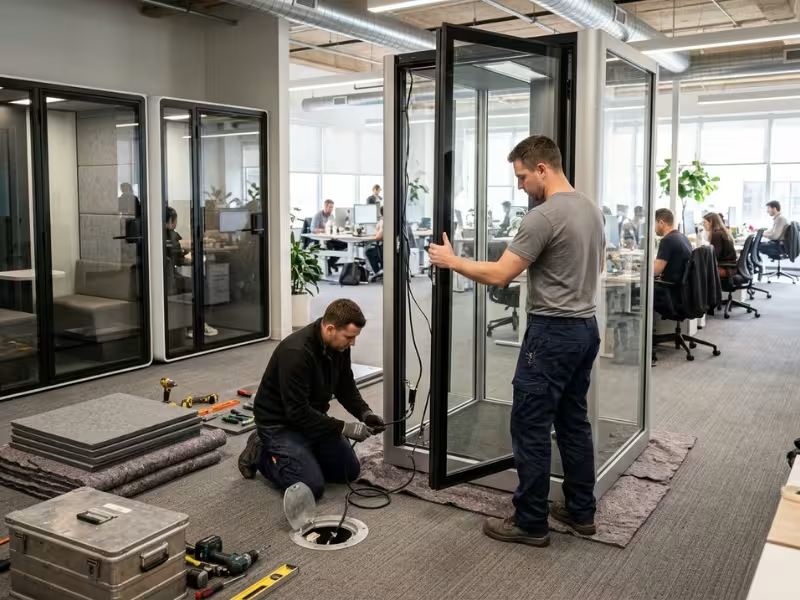
Pods ship as prefabricated panels. A crew assembles them on site, so you skip framing, drywall, taping, and painting.
Each unit stands on its own. It doesn’t attach to your walls or ceiling, which usually makes landlord approval much easier.
Lighting, ventilation, and power come built in. Most units plug into a standard outlet. In good models, a quiet fan replaces the air inside every one to two minutes.
Installation moves fast. A crew often sets up a phone booth in a few hours, and most meeting pods take a day or two. A drywall room usually takes weeks once permits and multiple trades get involved.
That freestanding design pays off later. You can take a pod apart, move it to a new zone, or reconfigure it when teams change. This mobility is what makes a scalable layout possible in the first place.
Audit Your Current Space Before You Plan Anything
Most buyers want to start with product brochures. I ask them to wait two weeks. Your floor already tells you which pods you need. You just have to watch it closely.
I split every audit into four parts. Each one answers a different question, and together they keep you from buying the wrong mix.
Watch How the Office Actually Works
Start with behavior, not opinions. Ask a team lead what they need, and you’ll hear “more meeting rooms.” Watch the floor, and you often see something else.
Track four things for two weeks:
- Desk occupancy: Count occupied desks at 10 a.m. and 2 p.m. Note your busiest day, not your average.
- Room bookings: Pull data from your booking system. Compare booked seats with the people who actually show up.
- Hallway calls: Tally people taking calls in stairwells, corridors, or by the elevators.
- Ad hoc meetings: Note groups that gather at desks, in the kitchen, or around a shared screen.
A simple spreadsheet works fine. One person walking the floor twice a day gives you enough data.

Spot the Friction Points
Patterns show up fast. Look for places where the work and the space clash.
- Noisy desk areas usually sit near sales or support teams. People there wear headphones all day, and their neighbors complain.
- Missing call space shows up as hallway traffic. If you count more than five corridor calls an hour, people have nowhere else to go.
- Overused meeting rooms tell a clear story in booking data. In many audits I run, half the bookings in 8- or 10-seat rooms involve three people or fewer.
Then flip the view. Mark corners nobody uses, oversized desk zones that sit half-empty, and dead space near windows or columns. These spots often become your best pod locations.
Count Demand by Interaction Type
Now sort every private moment you logged into four groups:
- Solo calls: usually under 20 minutes
- One-on-ones: feedback, interviews, and quick check-ins
- 2–4 person huddles: stand-ups, project reviews, and hybrid calls
- Longer focus sessions: an hour or more of quiet work
Note how often each one happens and how many happen at the same time. Peak overlap matters most. If eight solo calls overlap at 10 a.m., you need eight private spots, even if the daily total looks small.
This count shapes your pod mix. Lots of short solo calls point to booths. Frequent small groups point to meeting pods. Long, quiet sessions point to focus pods.
Document Physical Constraints
Last, measure what the building allows. Skipping this step causes most of the install-day surprises I see.
- Ceiling height: Most pods stand 2.2–2.4 m (87–94 in) tall. Check clearance under beams, ducts, and sprinkler heads.
- Columns: Mark every column. They can block a door swing, but they can also anchor a pod neatly.
- HVAC: Note supply and return vents. A pod placed under a return grille can disrupt airflow for nearby desks.
- Power: Map outlets and floor boxes. A pod far from power may need an electrician.
- Circulation: Mark main walkways, exit routes, and accessible paths. Pods should never narrow them.
Put all four layers on one floor plan. That single drawing will guide every pod decision you make from here.
Match Pod Types to Team Needs
Your audit shows what kinds of private moments happen on your floor. Now you match each one to the right unit. Most bad pod purchases start here, when a buyer picks the biggest or best-looking model instead of the one that fits the conversation.
I sort every request into four groups. Each pod type solves a different problem, so let’s take them one at a time.
Phone Booths: Usually the Smartest First Buy
A phone booth handles one person for 5 to 30 minutes. That covers client calls, quick video check-ins, and short bursts of focused reading or writing.
In most offices I plan, booths go in first. Solo calls happen far more often than any other private moment. They also cause the most visible problems: stairwell calls, noisy desks, and one person holding a 10-seat room.
Booths also use the least floor. At about 1 m² each, you can place two or three near your busiest call teams without moving a single desk. Within a few weeks, you’ll see whether hallway calls drop. That early result tells you a lot about what to buy next.
Meeting Pods: When Small Beats a Conference Room
Meeting pods come in a few common sizes, and each one has a clear job.
- 2-person pods suit manager feedback, recruiter interviews, and quick problem-solving between two colleagues.
- 4-person pods handle stand-ups, project reviews, and hybrid calls where two or three people join a remote team.
- 6-person pods work for small team meetings and client sessions that need a screen and a real table.
A pod beats a conference room when your booking data shows lots of small groups in big rooms. If most bookings in your 8- or 10-seat rooms involve three people or fewer, one 4-person pod can free those rooms for meetings that need them.
A pod doesn’t win every time. Skip it for workshops, all-day training, or sessions with more than six people. If your current rooms rarely fill up, a pod just adds another empty enclosed space. Fix the booking habits first, then reassess.

Focus and Wellness Pods: The Spaces People Forget
Not every private need involves talking. Some people need an hour of quiet to write a report, review code, or study a contract. A focus pod gives them a full desk, a proper chair, and strong ventilation for longer stays.
Wellness pods serve a different need. Nursing parents need a private, lockable space with seating and power. Some employees need a calm, low-stimulus room to step away from noise and bright light. Others use the space for prayer or a short mental reset.
I recommend planning at least one of these spaces in any office with more than 50 people. Choose soft, dimmable lighting, a comfortable seat, and a door that signals “occupied.” If you can, make this unit accessible as well, with a wider door and a level threshold.
Start With a Ratio, Then Adjust It
Ratios give you a fair starting point. They don’t replace your audit data.
For booths, I begin with one unit for every 10–15 employees who spend real time on calls. Then I adjust in two ways:
- Call-heavy teams need more. Sales, support, and recruiting floors often need one booth for every 6–8 people. Their calls run all day, and short waits quickly turn into desk calls.
- Hybrid attendance needs less, if you size it right. Base your count on your busiest in-office day, not the full roster. Say you have 100 employees, but only 65 come in on Tuesdays. Plan for those 65, then add extra booths near any call-heavy team.
For meeting pods, I usually start with one small pod per 25–40 people. Add more only when booking data shows steady small-group demand.
How the Pod Types Compare
Use this table to line up your audit results with the right unit.
|
Pod Type |
Best For |
Typical Session |
Space Cost |
Best First Use Case |
|---|---|---|---|---|
|
Phone booth |
Solo calls, video check-ins, short focus |
5–30 minutes |
About 1 m² (11 ft²) |
Clearing hallway and stairwell calls near call-heavy teams |
|
2-person pod |
Feedback, interviews, quick problem-solving |
15–45 minutes |
About 2–2.5 m² (22–27 ft²) |
Stopping two-person bookings in large rooms |
|
4-person pod |
Huddles, project reviews, hybrid calls |
30–60 minutes |
About 4–6 m² (45–65 ft²) |
Easing pressure on overbooked conference rooms |
|
6-person pod |
Small team meetings, client sessions |
45–90 minutes |
About 7–10 m² (75–108 ft²) |
Adding meeting space where you can’t build walls |
|
Focus pod |
Deep work, long solo tasks |
1–2 hours |
About 1.5–2.5 m² (16–27 ft²) |
Giving quiet space to teams near noisy zones |
|
Wellness pod |
Nursing, decompression, prayer |
15–45 minutes |
About 2–3 m² (22–32 ft²) |
Meeting inclusion needs in offices of 50+ people |
Match each pod to a real pattern from your audit. A unit sized for an actual need gets used every day.
Plan a Layout That Can Expand Without Rework
A pod layout rarely fails on day one. It fails when you add the seventh unit and find nowhere to put it. So I plan every floor in two versions: the layout you install now and the one you’ll need in two years.
Four habits keep those two versions working together.
Zone Pods by Behavior, Not Leftover Space
Start with where the work already happens. Pull out your audit map and circle the spots where calls and huddles cluster.
Booths belong beside call-heavy teams such as sales, support, and recruiting. Keep each one within a 10- to 15-second walk of the desks it serves. Any farther, and people take the call at their desk.
Meeting pods belong near collaboration zones: project areas, team neighborhoods, and shared work tables. People use a pod when it sits on their natural path.
Then mark your no-go zones. Kitchens, printers, coffee machines, and busy corridors bring steady noise and foot traffic. A grinder running at 80 dB right outside the glass can undo a well-built booth.
Leave Growth Slots on Purpose
Most layouts skip this step. It also saves the most money later.
A growth slot is an empty footprint you reserve for a future pod. Mark it on the floor plan with the full unit size, door swing, and walkway. For a booth, plan about 2–2.5 m² (22–27 ft²). For a four-person pod, plan 8–10 m² (86–108 ft²) with clearance.
Place each slot next to the pods you install now. When demand grows, the new unit joins an existing zone. You won’t have to squeeze it into an awkward spot.
Check power at every slot. A nearby outlet or floor box lets the new pod plug in on install day. A new circuit later can add $500–$2,000 and a week of delay.
Until you need a slot, fill it with things that move easily: lounge chairs, planters, or mobile whiteboards. Keep fixed desks out. Moving a row of desks disrupts a whole team. Sliding a lounge chair takes two minutes.
Protect Walkways, Access, and Daylight
Pods take up floor space. They should never block movement.
Keep walkways at least 36 in (90 cm) wide beside every unit. Go wider on main routes or wherever your local code requires it. Keep a clear, accessible route to at least one accessible pod, with about 60 in (1.5 m) of turning space at its door.
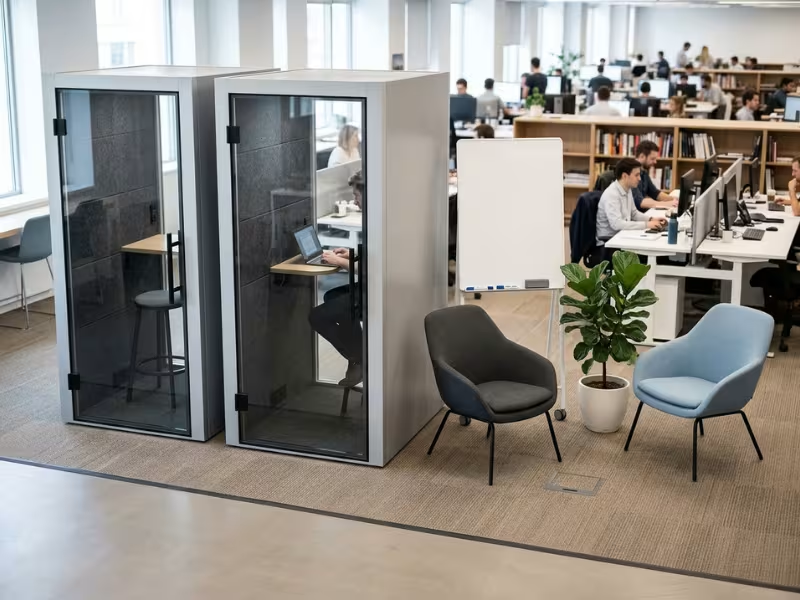
Watch sightlines, too. Glass fronts show people when a pod is free and keep the floor feeling open. Face doors toward the main path so people spot them at a glance.
Don’t push tall pods against windows. A 2.3 m unit can steal daylight from an entire desk row. Run pods perpendicular to the glass, or set them on the interior side of the floor, near the building core.
Placement Mistakes I Fix Most Often
Most layouts I get called in to fix share the same few errors. This table pairs each smart choice with the mistake it prevents.
|
Layout Choice |
Why It Works |
Common Mistake to Avoid |
|---|---|---|
|
Spread pods across zones |
Every team reaches a pod within a short walk |
Lining up every pod in one corner because it looks tidy on the plan |
|
Place booths beside call-heavy teams |
Short walks mean people actually use them |
Putting booths across the floor from the people who need them |
|
Keep a buffer from kitchens and printers |
Outside noise stays below what the booth can block |
Setting a booth next to the coffee machine |
|
Choose spots based on your audit data |
Pods land where demand already exists |
Treating leftover corners as the only option |
|
Reserve growth slots with power nearby |
New pods install in hours, not weeks |
Filling every open spot with fixed desks |
|
Keep walkways and windows clear |
The floor stays safe, accessible, and bright |
Blocking daylight or narrowing exit routes |
Treat the leftover corner as one option, not the default. If nobody walks past it, nobody will use the pod you put there.
Build a Phased Expansion Plan
Buying every pod at once feels efficient. In practice, it locks you into guesses about headcount, schedules, and habits. I break most rollouts into three phases, and I tie each one to data you can check on your own floor.
Each phase answers one question: what to buy now, when to buy more, and how to grow.
Phase 1: Fix the Loudest Problem First
Aim your first order at the highest-friction use case from your audit. In most offices, that means solo calls. Hallway calls, noisy desk rows, and one person holding a 10-seat room cause the most daily pain.
So start small. In a 60-person office, I often begin with three or four booths near call-heavy teams. I add one meeting pod only if booking data shows clear small-group pressure. Place each unit in the zones you mapped, and leave your growth slots open.
Then give the floor six to eight weeks. People need time to change habits before the numbers mean anything.
Phase 2: Set Trigger Points Before You Need Them
Write your expansion triggers down now, while nobody is asking for more pods. Clear numbers keep the loudest voice in the room from driving your next purchase.
I track four signals:
- Occupancy peaks: Booths stay in use more than 70% of the time during your two busiest hours.
- Booking delays: People can’t find a free small room within the same half-day.
- Complaint patterns: Noise or “no space” complaints come back after the first install.
- Queueing for pods: People wait outside a booth or drift back to the stairwell.
When two signals hold steady for three or four weeks, place the next order. One bad week doesn’t count. A steady pattern does.
Phase 3: Expand, Upgrade, or Reshape
Phase 3 can take three forms, and your data decides which one fits.
- Add more of the same when booths stay full and the type of demand hasn’t changed. Drop new units into the growth slots beside your current pods. With power already in place, they go in within hours.
- Introduce larger pods when people keep squeezing two into a booth or booking big rooms for four. A 4- or 6-person pod closes that gap.
- Repurpose underused desk space when hybrid attendance drops. If a desk row sits half-empty on your busiest day, swap part of it for a focus pod or meeting pod. You turn idle desks into space people actually use.
Why Phased Buying Is Safer
A phased plan protects you in three ways.
- You take on less risk. If your first booths sit empty, you learn that lesson for the cost of a few units, not a full floor.
- You keep the budget under control. Spreading purchases across two or three budget cycles keeps each approval smaller. Real usage data also makes each request easier to justify.
- You learn as you go. Phase 1 shows which models, finishes, and locations your team prefers. Standardize on those for later orders, and maintenance and future moves get much simpler.
Modular Pods vs Traditional Build-Outs
Clients often ask me to pick a winner. I don’t. Pods and built rooms solve different problems, and the best floors I plan use both. What matters is knowing which job belongs to which option.
Pods take most of the small, repeatable spaces. Construction still owns a few big, permanent ones.
Where Pods Win
- Speed. A crew sets up a phone booth in a few hours and most meeting pods in a day or two. A built room needs permits, several trades, and often two to three months of noise and dust. Your team keeps working while a pod goes in.
- Flexibility. Pods stand on their own, so you can shift them when teams reshuffle. A booth on casters rolls to a new zone in minutes. A drywall room stays exactly where you built it, even after the team that needed it moves.
- Relocation. When your lease ends, pods leave with you. Taking apart and rebuilding a larger pod often costs $1,500–$4,000. Drywall stays behind as a sunk cost, and some landlords charge you to remove it.
- Predictable expansion. Each pod carries a fixed unit price. Your Phase 2 order costs about the same as Phase 1, so budgeting stays simple. Construction quotes swing with labor rates, material prices, and surprises above the ceiling.
Compare the totals. A new built room often runs $30,000–$80,000 once you add walls, a door, power, lighting, and HVAC. For that money, you can place several booths and a four-person pod, and have them working within weeks.
Where Traditional Construction Still Wins
Pods have limits, and I tell clients about them upfront.
- Major permanent rooms. A 16-seat boardroom, a training room, or a space for all-hands meetings needs more room than most pods offer. If you know you’ll use that room every week for years, build it.
- Structural redesign. Pods can’t move a wall, add a staircase, or reroute plumbing and ductwork. Any project that changes the building itself needs a contractor.
- Full-scale architectural customization. A signature reception area, a custom ceiling, or a full video wall works best as part of the building. Pods offer finishes and glass options, but they won’t replace a complete architectural design.
How to Decide
I ask clients two questions. Will you need more of this space as you grow? And will this room still need the same size and location in five years?
If you need small enclosed spaces that repeat across the floor, choose pods. That covers calls, one-on-ones, huddles, and focus work. If you need a large room as part of a long-term plan, build it.
In an 80-person office, that often means one built boardroom and one training room. Pods then handle everything else. You only pay construction costs for the rooms that truly need walls.
Common Planning Mistakes and Objections
Every pod plan meets some pushback before anyone signs off. I hear the same four concerns on most projects. Each one is fair, and each one has a practical answer.
“Pods Look Bulky”
A pod only looks bulky when it sits in the wrong spot. A solid box pushed against a window row will dominate the floor. The same unit with a full glass front looks very different when it stands along a column line or near the building core. There, it blends in.
Glazing does most of the work. Clear or lightly frosted glass keeps sightlines open, so the floor still feels bright. Spread units across zones instead of stacking them in one block. Then match the frame finishes to your existing furniture.
“What About Ventilation?”
This concern is valid. A weak fan turns a pod stuffy within 15 minutes, and people prop the door open.
Skip phrases like “fresh-air system” and ask for numbers. A good unit replaces its full air volume every one to two minutes. That works out to roughly 30–60 air changes per hour. Then ask how loud the fan runs at that speed, in dB(A). If callers can hear the fan, they’ll switch it off.
“What If We Move?”
Pods can move with you. Booths on casters roll to a new spot in minutes. Larger pods need a crew to take them apart and rebuild them, which often costs $1,500–$4,000.
Standard models make this much easier. Stick to one or two pod types, and the crew already knows the assembly. Spare parts match, and the units fit common floor plans in your next office. Heavily customized pods often need custom fixes after every move.
“Acoustics Vary Too Much”
They do, and that’s why adjectives don’t help. “Soundproof” and “studio quality” are marketing words. No freestanding pod with a door, a vent, and a glass front blocks all sound.
Ask for tested speech reduction instead. Quality units cut speech noise by about 25–35 dB. Request a third-party report to ISO 23351-1, and compare those figures across every quote. If a vendor can’t share one, you have no real number to compare.
Real Layout Scenarios: How the Plan Plays Out
Planning rules make more sense on a real floor. Here are three layouts I see often, each at a different stage of growth.
A 25-Person Startup: Three Booths and One Pod
This team works on one open floor with a single conference room. Founders take investor calls in the stairwell. Two-person chats keep the room booked all day.
We start with three phone booths. Two sit near the sales and customer success desks. The third goes near the product team, away from the kitchen. Then we add one four-person pod beside the shared work tables for stand-ups and hybrid calls.
That mix frees the conference room for client meetings. We also mark one growth slot with an outlet nearby. When the team passes 35 people, a fourth booth can go in within hours.
An 80-Person Growth Company: Six Pods to Twelve
This company expects fast growth, so we design two layouts on day one. Phase 1 places six units: four booths and two four-person pods, spread across three zones.
Next to each group, we reserve growth slots for six more units and run power to them. Lounge chairs and planters fill those spots for now.
Fourteen months later, the trigger points hit. Booths stay busy more than 70% of the time at peak, and small rooms book out by noon. The client orders four more booths, one two-person pod, and one six-person pod. Each unit lands in a reserved slot. Nobody moves a desk, and the whole install takes two days.
A Hybrid HQ: Turning Empty Desks Into Quiet Rooms
This 200-person headquarters sees about 110 people on its busiest day. Desk data shows two full rows sitting empty, even on Tuesdays. At the same time, people complain they can’t find a quiet place to focus.
We remove 16 desks from those rows. In their place, we add four focus pods, three booths, and one wellness pod. The pods sit on the interior side of the floor, so daylight still reaches the remaining desks.
The company pays no extra rent. It turns idle floor into space people book every day. If attendance climbs again, the pods can move and the desks can come back.
All three plans start from floor data. Each one leaves room for the next change.
Before You Order Your First Pod
Start with two weeks of floor data, not a product brochure. Audit desk occupancy, room bookings, and hallway calls on your busiest days.
Next, map your pod zones. Place booths beside call-heavy teams and meeting pods near collaboration areas.
Then reserve growth slots next to those zones, with power already in reach.
Write down your expansion triggers before anyone asks for more pods. Clear numbers make the next order an easy call.
Finally, standardize on one or two pod models. Matching units keep maintenance, spare parts, and future moves simple.
Size your first order for the demand you can measure today, and let your floor tell you when to add the next pod.